Reproducibility in Computational Research
From scientific reproducibility to software environment management
Reproducibility is a cornerstone of computational research, yet achieving it across diverse computing environments remains challenging. This examines the landscape of software environment management tools and their role in enabling reproducible research workflows. We begin by clarifying the terminology around reproducibility, distinguishing between re-runnability, repeatability, reproducibility, reusability, and replicability. We then explore the multifaceted nature of package managers—as software tools, ecosystems, indices, and distributions—and categorize them by scope, distribution method, platform support, and linking strategy.
The core focus is on practical solutions to three critical problems: reproducing research software environments across different systems and platforms, customizing build processes while maintaining reproducibility (particularly for high-performance computing contexts), and distributing these environments effectively. We provide in-depth analysis of several key technologies: Conda/Mamba for cross-platform binary package management, (TODO: Pixi for modern Python project workflows with lock files and task automation, and brief overviews of Nix, Spack, and Docker). Through concrete examples ranging from pure Python packages to complex scientific software stacks and HPC system environments, we demonstrate how these tools address real-world reproducibility challenges. The presentation emphasizes the importance of understanding the ecosystem around package managers, including channels like conda-forge, and discusses advanced topics such as build customization, platform-specific optimizations, (TODO: and the trade-offs between source and binary distributions).
reproducibility, package management, conda, mamba, pixi, scientific computing, environment management, dependency resolution, cross-platform deployment, high-performance computing
Introduction
What is reproducibility?
According to Hernández and Colom (2023),
- Re-runnable (\(R^1\))
- Repeatable (\(R^2\))
- Reproducible (\(R^3\))
- Reusable (\(R^4\))
- Replicable (\(R^5\))
| Goodman | Claerbout | ACM |
|---|---|---|
| Repeatability | ||
| Methods reproducibility | Reproducibility | Replicability |
| Results reproducibility | Replicability | Reproducibility |
| Inferential reproducibility |
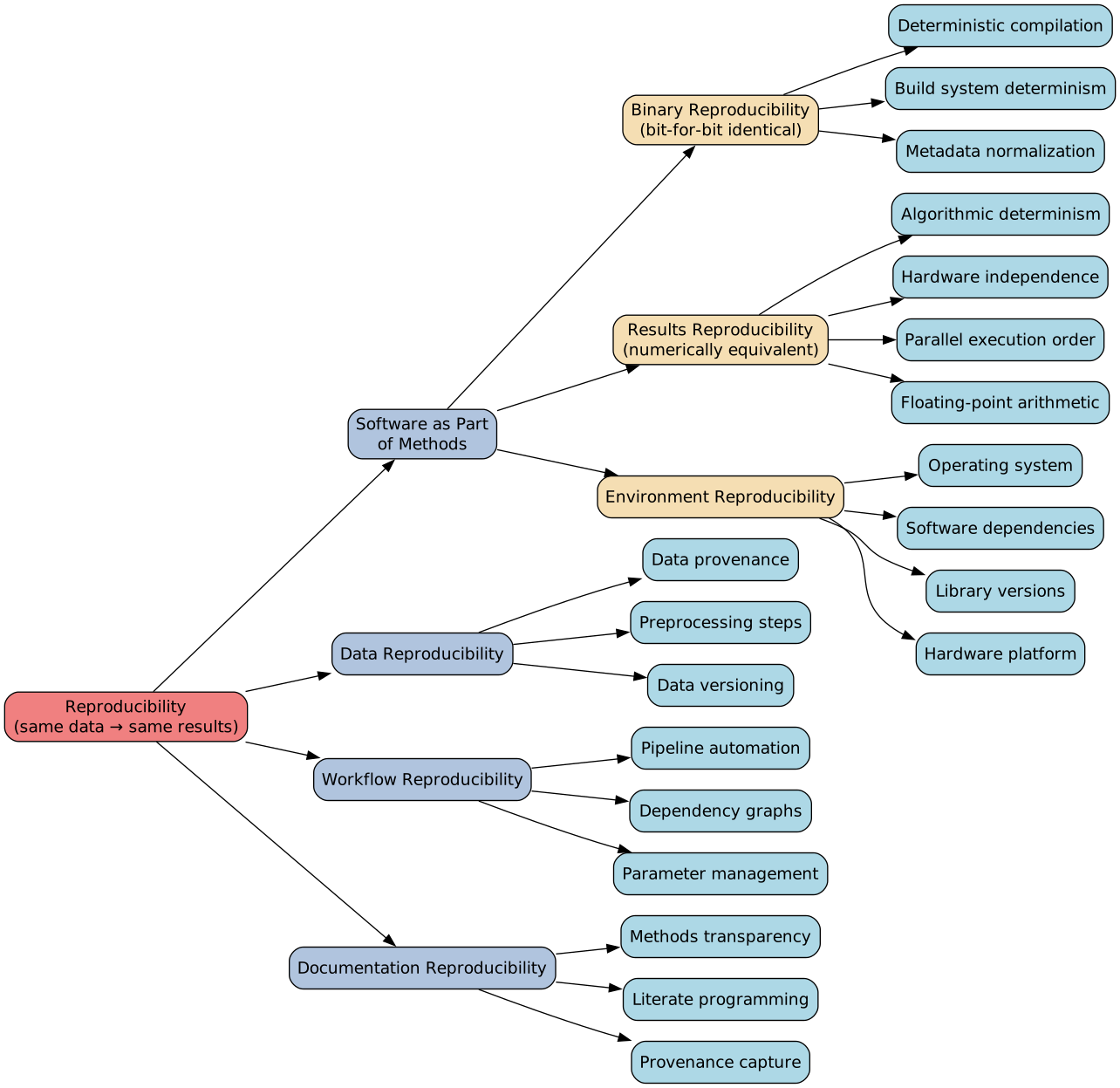
Defining reproducibility is surprisingly challenging, as the terminology varies significantly across different fields and communities. When researchers discuss reproducibility and related concepts, they may use the same words with entirely different meanings, so it is essential to be aware of whom you are speaking with. In our field, we typically focus on what might be called “methods reproducibility,” which centers on the recipe—how you take the same piece of data and use the same software to reproduce exactly the same kind of result. This contrasts with “results reproducibility,” which is more about replicating the science: given the same data, researchers are free to implement their own software to verify findings.
When we talk about computational reproducibility, there are actually many interconnected components. At its core, we are asking whether the same data can produce the same results. This involves not just the data itself but also the software, the workflow (ensuring that complex procedures are reproducible and produce the intended outputs), and the operational environment. Binary reproducibility—where compiling the same source code twice produces bit-for-bit identical binaries—is technically achievable but extremely difficult and, for many practical purposes, not critically important. Source reproducibility, where the same program with the same input produces exactly the same output, is also challenging because factors like floating-point arithmetic being non-associative mean that adding numbers in a different order yields different results. The focus of this discussion is primarily on environment reproducibility: how can you ensure that from a given source code, you can build the software and construct an environment (potentially including multiple software components, dependencies, and even the operating system itself) to load your data and ultimately obtain your results?
What is a package manager?
“Package manager” can refer to multiple things:
- Software/tool: The CLI program (
conda,pip,apt)- Installs, updates, resolves dependencies
- Ecosystem: The collection of available packages
- “Install scipy via conda” \(\Rightarrow\) scipy is packaged for conda
- Index/channel/registry: Where packages are hosted
- conda-forge, PyPI, npm registry, Debian repos
- Distribution (sometimes): Bundled tool + curated packages
- Anaconda = conda + default channels + selected packages
The term “package manager” can refer to several distinct but related concepts. First and most obviously, it refers to the software program itself—the command-line tool you invoke when you type conda, pip, apt, or similar commands. But when you tell someone they can use conda to install SciPy or NumPy, you are not merely describing the capability of the software; you are implicitly referring to the ecosystem in which that package has been prepared and made available. The packaging work that enables this installation is substantial.
Additionally, package managers involve an index (sometimes called a channel or registry). For users of systems like Ubuntu, adding a repository URL before installing certain packages is a familiar operation—you are telling the package manager where to look for the software. Finally, a package manager can sometimes refer to an entire distribution. For example, when people install Anaconda, they are getting a distribution: a bundle of the conda command-line tool, a default channel, and a curated selection of packages. Similarly, Miniforge is a distribution containing conda, mamba, the conda-forge channel, and a minimal set of packages.
What kinds of package managers?
By scope:
- System-level (OS packages): apt, dnf, zypper, pacman, brew, nix
- Language/library-specific: pip (Python), npm (JavaScript), cargo (Rust), gem (Ruby), Maven (Java)
- Application bundlers: snap, flatpak, AppImage (self-contained apps with dependencies)
By distribution method:
- Source-based: Gentoo Portage, BSD ports, AUR (compile on your machine)
- Binary-based: apt, dnf, brew (download precompiled)
- Hybrid: Homebrew (bottles + source fallback), Nix
By platform:
- Single-platform: apt (Debian/Ubuntu), winget (Windows), pkg (FreeBSD)
- Cross-platform: conda, Nix, pkgsrc, Homebrew
By linking strategy:
- Dynamic linking: Traditional package managers (shared system libraries)
- Static/bundled: Flatpak, snap, AppImage (everything included)
Package managers can be categorized in several ways. Some are specialized for operating systems—apt for Debian-based systems, for instance—and you would typically not want to use these for building your entire scientific software dependency stack. However, you would need them to install low-level, system-specific components. Others are language-specific, such as pip for Python. There is also a distinction between source-based and binary-based package managers. In the Python ecosystem, historically (and sometimes still today), packages could be distributed as source distributions, requiring the build process to occur on your local machine. Some package managers exclusively fetch source and always build locally, which can be useful—particularly in the HPC context where you want software optimized for a specific architecture. Binary-based package managers, by contrast, distribute pre-compiled packages. Platform support is another important consideration: can the package manager handle different computer architectures or operating systems? Cross-platform capability is valuable for deployment scenarios where you package your software once but deploy it across multiple environments.
Problem statements
- How to reproduce the environment of a bundle of research software across different systems, platforms?
- How to customize the build process (e.g. optimization, vendor-provided compilers, interconnect libraries, etc.) while maintaining reproducibility?
- How to distribute the environment?
With this background established, we can now articulate the specific problem statements this discussion aims to address. First, how do we reproduce an environment containing a bundle of research software across different systems and platforms? “System” here refers to operating systems like macOS or Linux, while “platform” refers to architectures like x86-64 or ARM. Second, how do we customize the build process—for example, using vendor-provided compilers or interconnect libraries like MPI—while still maintaining reproducibility? This is particularly important in the HPC context, where we need to deploy software and want to extract maximum performance. Third, once we know how to build an environment on a particular system (whether a local computer, a workstation, or a specific HPC cluster), how do we translate that environment to another system?
Conda
The problem with PyPI packages
From pixell/setup.py at b41248618ce92277a19a4efccadfc3b7403d67f5 · simonsobs/pixell
#!/usr/bin/env python
# -*- coding: utf-8 -*-

"""The setup script."""
from __future__ import print_function
import setuptools
from setuptools import find_packages
from distutils.errors import DistutilsError
from numpy.distutils.core import setup, Extension, build_ext, build_src
import versioneer
import os, sys
import subprocess as sp
import numpy as np

build_ext = build_ext.build_ext
build_src = build_src.build_src


compile_opts = {
    #'extra_compile_args': ['-std=c99','-fopenmp', '-Wno-strict-aliasing', '-g', '-O0', '-fPIC', '-fsanitize=address', '-fsanitize=undefined'],
    'extra_compile_args': ['-std=c99','-fopenmp', '-Wno-strict-aliasing', '-g', '-Ofast', '-fPIC'],
    'extra_f90_compile_args': ['-fopenmp', '-Wno-conversion', '-Wno-tabs', '-fPIC'],
    'f2py_options': ['skip:', 'map_border', 'calc_weights', ':'],
    'extra_link_args': ['-fopenmp', '-g', '-fPIC', '-fno-lto']
    }

# Set compiler options
# Windows
if sys.platform == 'win32':
    raise DistutilsError('Windows is not supported.')
elif sys.platform == 'darwin' or sys.platform == 'linux':
    environment = os.environ

    if not 'CC' in environment:
        environment["CC"] = "gcc"

    if not "CXX" in environment:
        environment["CXX"] = "g++"

    if not "FC" in environment:
        environment["FC"] = "gfortran"

    # Now, try out our environment!
    c_return = sp.call([environment["CC"], *compile_opts["extra_compile_args"], "scripts/omp_hello.c", "-o", "/tmp/pixell-cc-test"], env=environment)

    if c_return != 0:
        raise EnvironmentError(
            "Your C compiler does not support the following flags, required by pixell: "
            f"{' '.join(compile_opts['extra_compile_args'])}"
            ". Consider setting the value of environment variable CC to a known good gcc install. "
            "The built-in Apple clang does not support OpenMP. Use Homebrew to install either gcc or llvm. "
            f"Current value of $CC is {environment['CC']}.",
        )
    else:
        print(f"C compiler found ({environment['CC']}) and supports OpenMP.")


    cxx_return = sp.call([environment["CXX"], *compile_opts["extra_compile_args"], "scripts/omp_hello.c", "-o", "/tmp/pixell-cxx-test"], env=environment)

    if cxx_return != 0:
        raise EnvironmentError(
            "Your CXX compiler does not support the following flags, required by pixell: "
            f"{' '.join(compile_opts['extra_compile_args'])}"
            ". Consider setting the value of environment variable CXX to a known good gcc install. "
             "The built-in Apple clang does not support OpenMP. Use Homebrew to install either gcc or llvm. "
            f"Current value of $CXX is {environment['CXX']}.",
        )
    else:
        print(f"CXX compiler found ({environment['CXX']}) and supports OpenMP.")

    fc_return = sp.call([environment["FC"], *compile_opts["extra_f90_compile_args"], "scripts/omp_hello.f90", "-o", "/tmp/pixell-fc-test"], env=environment)

    if fc_return != 0:
        raise EnvironmentError(
            "Your Fortran compiler does not support the following flags, required by pixell: "
            f"{' '.join(compile_opts['extra_f90_compile_args'])}"
            ". Consider setting the value of environment variable FC to a known good gfortran install."
            f"Current value of $FC is {environment['FC']}.",
        )
    else:
        print(f"Fortran compiler found ({environment['FC']}) and supports OpenMP.")

    # Why do we remove -fPIC here?
    compile_opts['extra_link_args'] = ['-fopenmp']
else:
    raise EnvironmentError("Unknown platform. Please file an issue on GitHub.")

def pip_install(package):
    import pip
    if hasattr(pip, 'main'):
        pip.main(['install', package])
    else:
        pip._internal.main(['install', package])

with open('README.rst') as readme_file:
    readme = readme_file.read()

with open('HISTORY.rst') as history_file:
    history = history_file.read()

requirements =  ['numpy>=1.20.0',
                 'astropy>=2.0',
                 'setuptools>=39',
                 'h5py>=2.7',
                 'scipy>=1.0',
                 'python_dateutil>=2.7',
                 'cython<3.0.4',
                 'healpy>=1.13',
                 'matplotlib>=2.0',
                 'pyyaml>=5.0',
                 'Pillow>=5.3.0',
                 'pytest-cov>=2.6',
                 'coveralls>=1.5',
                 'pytest>=4.6',
                 'ducc0>=0.31.0']


test_requirements = ['pip>=9.0',
                     'bumpversion>=0.5',
                     'wheel>=0.30',
                     'watchdog>=0.8',
                     'flake8>=3.5',
                     'coverage>=4.5',
                     'Sphinx>=1.7',
                     'twine>=1.10',
                     'numpy>=1.20',
                     'astropy>=2.0',
                     'setuptools>=39.2',
                     'h5py>=2.7,<=2.10',
                     'scipy>=1.0',
                     'python_dateutil>=2.7',
                     'cython<3.0.4',
                     'matplotlib>=2.0',
                     'pyyaml>=5.0',
                     'pytest-cov>=2.6',
                     'coveralls>=1.5',
                     'pytest>=4.6']

# Why are we doing this instead of allowing the environment to do this? We should just use -O3 and -fPIC.
fcflags = os.getenv('FCFLAGS')
if fcflags is None or fcflags.strip() == '':
    fcflags = ['-O3','-fPIC']
    #fcflags = ['-O0','-fPIC', '-fsanitize=address', '-fsanitize=undefined']
else:
    print('User supplied fortran flags: ', fcflags)
    print('These will supersede other optimization flags.')
    fcflags = fcflags.split()

compile_opts['extra_f90_compile_args'].extend(fcflags)
compile_opts['extra_f77_compile_args'] = compile_opts['extra_f90_compile_args']

def presrc():
    # Create f90 files for f2py.
    if sp.call('make -C fortran', shell=True) != 0:
        raise DistutilsError('Failure in the fortran source-prep step.')

def prebuild():
    # Handle cythonization
    no_cython = sp.call('cython --version',shell=True)
    if no_cython:
        try:
            print("Cython not found. Attempting a conda install first.")
            import conda.cli
            conda.cli.main('conda', 'install',  '-y', 'cython')
        except:
            try:
                print("conda install of cython failed. Attempting a pip install.")
                pip_install("cython")
            except:
                raise DistutilsError('Cython not found and all attempts at installing it failed. User intervention required.')

    if sp.call('make -C cython',  shell=True) != 0:
        raise DistutilsError('Failure in the cython pre-build step.')


class CustomBuild(build_ext):
    def run(self):
        print("Running build...")
        prebuild()
        # Then let setuptools do its thing.
        return build_ext.run(self)

class CustomSrc(build_src):
    def run(self):
        print("Running src...")
        presrc()
        # Then let setuptools do its thing.
        return build_src.run(self)

class CustomEggInfo(setuptools.command.egg_info.egg_info):
    def run(self):
        print("Running EggInfo...")
        presrc()
        prebuild()
        return setuptools.command.egg_info.egg_info.run(self)

# Cascade your overrides here.
cmdclass = {
    'build_ext': CustomBuild,
    'build_src': CustomSrc,
    'egg_info': CustomEggInfo,
}
cmdclass = versioneer.get_cmdclass(cmdclass)


setup(
    author="Simons Observatory Collaboration Analysis Library Task Force",
    author_email='mathewsyriac@gmail.com',
    classifiers=[
        'Development Status :: 2 - Pre-Alpha',
        'Intended Audience :: Developers',
        'License :: OSI Approved :: BSD License',
        'Natural Language :: English',
        "Programming Language :: Python :: 2",
        'Programming Language :: Python :: 2.7',
        'Programming Language :: Python :: 3',
        'Programming Language :: Python :: 3.4',
        'Programming Language :: Python :: 3.5',
        'Programming Language :: Python :: 3.6',
    ],
    description="pixell",
    package_dir={"pixell": "pixell"},
    entry_points={
    },
    ext_modules=[
        Extension('pixell.cmisc',
            sources=['cython/cmisc.c','cython/cmisc_core.c'],
            libraries=['m'],
            include_dirs=[np.get_include()],
            **compile_opts),
        Extension('pixell.distances',
            sources=['cython/distances.c','cython/distances_core.c'],
            libraries=['m'],
            include_dirs=[np.get_include()],
            **compile_opts),
        Extension('pixell.srcsim',
            sources=['cython/srcsim.c','cython/srcsim_core.c'],
            libraries=['m'],
            include_dirs=[np.get_include()],
            **compile_opts),
        Extension('pixell._interpol_32',
            sources=['fortran/interpol_32.f90'],
            **compile_opts),
        Extension('pixell._interpol_64',
            sources=['fortran/interpol_64.f90'],
            **compile_opts),
        Extension('pixell._colorize',
            sources=['fortran/colorize.f90'],
            **compile_opts),
        Extension('pixell._array_ops_32',
            sources=['fortran/array_ops_32.f90'],
            **compile_opts),
        Extension('pixell._array_ops_64',
            sources=['fortran/array_ops_64.f90'],
            **compile_opts),
    ],
    include_dirs = [],
    library_dirs = [],
    install_requires=requirements,
    extras_require = {'fftw':['pyFFTW>=0.10'],'mpi':['mpi4py>=2.0']},
    license="BSD license",
    long_description=readme + '\n\n' + history,
    package_data={'pixell': ['pixell/tests/data/*.fits','pixell/tests/data/*.dat','pixell/tests/data/*.pkl']},
    include_package_data=True,
    data_files=[('pixell', ['pixell/arial.ttf'])],
    keywords='pixell',
    name='pixell',
    packages=find_packages(),
    test_suite='pixell.tests',
    tests_require=test_requirements,
    url='https://github.com/simonsobs/pixell',
    version=versioneer.get_version(),
    zip_safe=False,
    cmdclass=cmdclass,
    scripts=['scripts/test-pixell']
)

print('\n[setup.py request was successful.]')
This example from the pixell package illustrates the problems inherent in PyPI packages. First, note that this is a setup.py file, which is notorious and increasingly deprecated—the package has since moved away from this approach. But this serves as a useful illustration of how problematic things can become. The script checks whether it is running on Windows (which it does not support), and on Darwin (macOS) or Linux, it attempts to infer what compiler is available on the system. At various points in the script’s history, it would list executables in different paths like /usr/bin or /usr/local/bin and try to locate compilers such as Fortran compilers. If unsuccessful, it would search other paths. This approach is inherently unstable and completely non-reproducible. If someone can install this package on their computer, there is no guarantee that it will successfully compile on another computer. The error messages in such cases can be extremely cryptic and difficult to debug.
The necessity of conda
it really sounds like your needs are so unusual compared to the larger Python community that you’re just better off building your own
From 2012 PyData Workshop Panel Discussion with Guido van Rossum. See Conda: Myths and Misconceptions | Pythonic Perambulations.
This quote comes from Guido van Rossum himself at a 2012 meeting. The statement essentially acknowledges that scientific computing needs are so unusual compared to the larger Python community that building a specialized package manager makes sense. This was the genesis of conda. The developers had been experiencing numerous build problems with complex scientific software—packages involving C compilers, Fortran compilers, and intricate linking requirements. The complexity became so overwhelming that this statement became the catalyst for creating conda.
The conda solution
| Section | Who needs it? | Architecture? | Example |
|---|---|---|---|
| Build | The compiler machine | Build Platform (e.g., x86) | cmake, gcc, make |
| Host | The package being built (linking phase) | Target Platform (e.g., ARM64) | openssl, python, libpng |
| Run | The final user | Target Platform (e.g., ARM64) | python, requests, numpy |
Multi-platform
Linux-x86_64Linux-aarch64Linux-ppc64leMacOSX-x86_64MacOSX-arm64Windows-x86_64
Language agnostic
- Python
- C/C++
- Fortran
- R
- Rust
- bash
juliaup- …
The conda solution addresses many of these challenges. One key aspect is the separation of build dependencies, which isolates your environment so that builds become more reproducible and less dependent on the host machine. This provides a higher degree of reproducibility: if you install something on your computer and it runs, there is a high probability it will work on another computer as well. It is not guaranteed, but the probability is significantly higher than with traditional approaches. The concept is sometimes called a “hermetic build”—the ability to bootstrap everything from scratch. Conda is close to achieving this, though not 100% hermetic. This is a useful property for achieving reproducibility.
Conda supports many platforms, though notably not all—OpenBSD and FreeBSD, for example, are not supported. From the ground up, conda was designed to be language-agnostic. While it is primarily associated with Python packages, you can use it to package anything: C/C++, Fortran, R, Rust, bash scripts, and even Julia (via juliaup). Though it should be noted that Julia’s packaging situation through conda is not ideal, this is not conda’s fault.
Conda vs. Mamba + conda-forge
- Mamba as software
- mamba started as a new solver (borrowed from RHEL) to overcome the performance problem of the conda SAT solver implemented in Python
- has fully matured, almost drop-in replacement of conda
- the conda-forge channel
- the default channel in conda/mamba points to the channel (repository, index) by Anaconda. These packages are built and maintained by Anaconda
- anyone can create new channels hosted on anaconda.org, the most prominent one being conda-forge
- conda-forge is many things
- GitHub Organization with many repos: feedstocks
- each feedstock contains
meta.yamlat minimum to define the packages - CI is deployed (with the infrastructure including bots defined by conda-forge) to build the same package across platforms and Python versions and possibly any variants (e.g. MPI backend)
- miniforge: a distribution containing a minimal set of software including
conda,mamba,python, etc. This is similar to the Anaconda distribution or mini-conda distribution. - micromamba: a statically linked version of mamba that does a subset of what mamba does. Recommendation: don’t use it unless you deploy it in CI
- packages in conda-forge are better packaged in general
- e.g. different BLAS and MPI variants
There is some potential confusion around the terminology in this ecosystem. Mamba started as a new solver borrowed from Red Hat Enterprise Linux to overcome the performance problems of conda’s SAT solver, which was implemented in Python. The original conda solver works correctly but is very slow—as people built larger and larger environments, solving could take hours. Mamba has now fully matured into an almost drop-in replacement for conda, and its solver has been merged back into conda, so the default conda solver is now also fast. Personally, I now only use mamba.
The default channel in conda/mamba points to packages built and maintained by Anaconda. However, anyone can create new channels hosted on anaconda.org. The most prominent community channel is conda-forge, which is many things at once: it is a GitHub organization with many repositories called feedstocks. Each feedstock contains at minimum a meta.yaml file that defines how to build the package. Continuous integration is deployed using infrastructure defined by conda-forge to build the same package across platforms, Python versions, and various variants (such as different MPI backends). This is a large and useful ecosystem, and for many scientific packages, conda-forge does a better job of packaging than the alternatives.
How conda/mamba achieves reproducibility
- a package distributed via conda-forge has a strong guarantee of reproducibility by its design
- conda/mamba specific design decisions
- conda-forge specific design in infrastructure and CI
| Section | Who needs it? | Architecture? | Example |
|---|---|---|---|
| Build | The compiler machine | Build Platform (e.g., x86) | cmake, gcc, make |
| Host | The package being built (linking phase) | Target Platform (e.g., ARM64) | openssl, python, libpng |
| Run | The final user | Target Platform (e.g., ARM64) | python, requests, numpy |
If you manage to package your software for conda-forge, it achieves a high degree of scalability and reproducibility. This in itself is a valuable exercise. Personally, when releasing a package, I always release it on PyPI first—partly to claim the namespace, as this is the authoritative source for how people find Python packages. But the next step is to distribute it via conda in some form. Packaging for conda-forge is harder than for PyPI, but this difficulty is the cost of guarantees. The separation of build, host, and runtime dependencies ensures clean builds across different platforms. The CI system is particularly useful because it operates in isolated environments independent of your local computer, testing your package on various systems you might not otherwise have access to.
How conda/mamba+conda-forge achieves customizability
Quoting directly from Knowledge Base | conda-forge | community-driven packaging for conda
You can switch your BLAS implementation by doing,
conda install "libblas=*=*_mkl"
conda install "libblas=*=*_openblas"
conda install "libblas=*=*_blis"
conda install "libblas=*=*_accelerate"
conda install "libblas=*=*_newaccelerate"
conda install "libblas=*=*_netlib"
MPI:
- mpi variants can be explicitly requested with
pkg=*=mpi_{{ mpi }}_* - any mpi variant, ignoring provider, can be requested with
pkg=*=mpi_* - nompi variant can be explicitly requested with
pkg=*=nompi_*
Or even microarch! See Microarchitecture-optimized builds
This addresses the second problem statement regarding customization. You can choose different BLAS implementations—the build matrix is quite large for some packages. By default on x86-64, you might get MKL, but you can also select OpenBLAS, BLIS, Accelerate (on macOS), or Netlib. Different MPI implementations are also available: OpenMPI, MPICH, or no MPI at all. The reason for the “no MPI” variant is that MPI libraries can be difficult to run in certain situations, so if you only need serial execution, avoiding MPI dependencies simplifies things.
Even microarchitecture optimization is now possible. On x86-64, there are officially four different levels of microarchitecture, each with different instruction sets and vectorization widths. AVX-512, for example, uses 512-bit vectors, so with 64-bit floating-point numbers you can process eight operations concurrently in one cycle. Optimization per microarchitecture is important for squeezing out the maximum FLOPS from your CPU, and conda-forge now provides this level of control.
How to distribute a conda/mamba environment
Conda/mamba environment is designed to be reproducible with a different prefix (see the placeholder trick in Detailed operations — documentation)
To reproduce an environment
# this is analogous to a lockfile
mamba env export > environment.yml
# this will reproduce exactly the same environment on machine with the same architecture
mamba env create -f environment.yml
Create an environment (env2) as a clone of an existing environment (env1):
conda create -n env2 --clone path/to/file/env1
The last problem statement concerns distributing environments across systems. The most rudimentary approach involves exporting an environment to a YAML file—essentially a lock file—and then creating an environment from that file on another system. In some cases, you can reproduce exactly the same environment, though platform differences may prevent this. For example, if the exported file includes MKL libraries (which are x86-64 specific), attempting to recreate the environment on ARM would fail. But within the same architecture (such as Linux x86-64), this approach works reliably.
Cloning environments is another option that might seem trivial—just copying a directory to another path. However, if you understand prefix paths and how they work, simply moving a directory would break your environment. Conda employs a “relocatable” trick that allows environments to work with different prefixes, which is quite useful.
Example: how to package a pure Python package that’s already on PyPI
grayskull pypi pytestSee more in conda/grayskull: Grayskull - Recipe generator for Conda.
For simple cases, particularly pure Python projects that are already on PyPI, there is a tool called Grayskull that can generate a conda recipe automatically. It will create a recipe for you that is not 100% correct all the time—sometimes minor modifications are needed—but this is as good as it gets for simple projects. For pure Python packages, it often just works out of the box.
Example: how to package a complex scientific software
{% set name = "ducc0" %}
{% set version = "0.39.1" %}

package:
  name: {{ name|lower }}
  version: {{ version }}

source:
  url: https://pypi.org/packages/source/{{ name[0] }}/{{ name }}/ducc0-{{ version }}.tar.gz
  sha256: 38eda188733d43c3602726e28bc9928d3117cdc23b5c1e7d89fdc26004a1d847

build:
  number: 1
  skip: true  # [py<=36]
  script_env: DUCC0_OPTIMIZATION=portable
  script: {{ PYTHON }} -m pip install . -vv

requirements:
  build:
    - python                                 # [build_platform != target_platform]
    - cross-python_{{ target_platform }}     # [build_platform != target_platform]
    - pybind11                               # [build_platform != target_platform]
    - nanobind
    - make
    - cmake
    - {{ compiler('c') }}
    - {{ stdlib("c") }}
    - {{ compiler('cxx') }}
  host:
    - pip
    - pybind11
    - nanobind
    - python
    - make
    - cmake
    - scikit-build
    - scikit-build-core
  run:
    - numpy >=1.17.0
    - python

test:
  imports:
    - ducc0
  commands:
    - pip check
  requires:
    - pip

about:
  home: https://gitlab.mpcdf.mpg.de/mtr/ducc
  summary: Distinctly useful code collection
  license: GPL-2.0-or-later
  license_file: LICENSE

extra:
  recipe-maintainers:
    - ickc
    - MarkWieczorek
    - mreineck
This example from the ducc0 feedstock (a CMB-related scientific package) demonstrates more complex packaging. It shows the concrete implementation of concepts discussed earlier: the separation of build, host, and runtime environments. Writing these recipes can be challenging, especially when starting out—you might encounter cryptic errors and need to experiment. The CI allows you to test your package on conda-forge’s infrastructure. Most packages include simple tests like importing the module successfully, which is not a full test suite but provides basic validation that the build succeeded.
Example: how to package a complex scientific software (cont’d)
{% set version = "2.3.14" %}
{% set sha256 = "924912213af3bbacd622b9318bd6d79055c4d57f58c2da486f4b3f62a12466f1" %}

{% set build = 2 %}
{% if blas_impl == 'openblas' %}
{% set build = build + 100 %}
{% endif %}

{% set blas_prefix = blas_impl %}

package:
  name: toast
  version: {{ version }}

source:
  url: https://github.com/hpc4cmb/toast/archive/{{ version }}.tar.gz
  sha256: {{ sha256 }}

build:
  skip: True  # [py<37]
  skip: True  # [win]
  number: {{ build }}
  string: "{{ blas_prefix }}_py{{ py }}h{{ PKG_HASH }}_{{ build }}"
  run_exports:
    - toast * {{ blas_prefix }}_*

requirements:
  build:
    - {{ compiler('c') }}
    - {{ compiler('cxx') }}
    - cmake
    - make                 # [unix]
    - llvm-openmp >=4.0.1  # [osx]
  host:
    - llvm-openmp >=4.0.1  # [osx]
    - python
    - fftw  # [blas_impl == 'openblas']
    - openblas * openmp_*  # [blas_impl == 'openblas']
    - mkl-devel  # [blas_impl == 'mkl']
    - liblapack
    - suitesparse
    - libaatm
  run:
    - llvm-openmp >=4.0.1  # [osx]
    - python
    - {{ pin_compatible("fftw") }}  # [blas_impl == 'openblas']
    - openblas * openmp_*  # [blas_impl == 'openblas']
    - {{ pin_compatible("mkl") }}  # [blas_impl == 'mkl']
    - {{ pin_compatible("liblapack") }}
    - {{ pin_compatible("suitesparse") }}
    - {{ pin_compatible("libaatm") }}
    - numpy
    - scipy
    - astropy
    - healpy
    - h5py
    - ephem

test:
  files:
    - run_test.sh
  commands:
    - ./run_test.sh

about:
  home: https://github.com/hpc4cmb/toast
  license: BSD-2-Clause
  license_family: BSD
  license_file: LICENSE
  summary: 'Time Ordered Astrophysics Scalable Tools'
  description: |
    TOAST is a software framework for simulating and processing timestream data
    collected by microwave telescopes.
  dev_url: https://github.com/hpc4cmb/toast

extra:
  recipe-maintainers:
    - tskisner
This even more complex example from the TOAST feedstock demonstrates how to pin to compiler components without specifying implementation details—dispatching between clang and LLVM, for instance. This is a template defined by conda-forge, not native to conda itself. You can see conditional logic embedded in what appear to be YAML comments (using Jinja2 templating). The recipe handles different BLAS implementations and MPI variants, showing how the build matrix can become quite sophisticated for packages with many optional dependencies.
Example: how to reproduce a set of system softwares on HPC
From bootstrapping-os-environments/conda/system/pixi.toml at main · ickc/bootstrapping-os-environments
channels:
- conda-forge
dependencies:
- bash
- bat
- bat-extras
- bottom
- btop
- bzip2
- clang-format
- coreutils
- curl
- difftastic
- diffutils
- direnv
- dua-cli
- dust
- exiftool
- fastfetch
- fd-find
- ffmpeg
- file
- findutils
- fzf
- gawk
- gh
- ghostscript
- git
- git-delta
- gnu-units
- go-shfmt
- go-task
- graphviz
- grep
- gzip
- htop
- hyperfine
- imagemagick
- inetutils
- joshuto
- jq
- juliaup
- libarchive
- lsdeluxe
- make
- mediainfo
- mosh
- nano
- nvtop
- onefetch
- openssh
- pandoc
- parallel
- patch
- pdf2svg
- pixi
- poppler
- prettier
- ripgrep
- rsync
- sed
- shellcheck
- starship
- tar
- tmux
- tokei
- tree
- unzip
- uv
- wget
- which
- zellij
- zsh
- zstd
name: system
This example addresses how to reproduce a set of system software on HPC. Consider tools like fzf, fd-find, curl, bat, ripgrep, and others that you might want available on any system you work on. In the past, HPC environments were often quite minimal, lacking many common utilities. I have experimented extensively with different methods of installing command-line tools in user home directories on Linux—from source compilation to Gentoo’s Portage—but this approach is the best I have found. It leverages the fact that conda is a cross-platform, language-agnostic package manager. It does not have to be for Python software; many of these packages are essentially just downloads that get expanded, but the process is more convenient and more secure than manually downloading and extracting archives.
Example: how to distribute a complex scientific software environment on a heterogeneous HPC cluster
SO:UK Data Centre example:
- ickc/python-pmpm: Python manual package manager: built on top of conda to bootstrap Python packages and build tools (e.g. compilers)
- optimize per microarch (
x86_64-v3,x86_64-v4, etc.)
- optimize per microarch (
- CI/CD workflow using GitHub Actions to create a distribution with a predefined prefix: ickc/so-software-environment: scripts and documentation on bootstrapping a SO software environment in SO:UK.
- staged it via special node to unarchive it at that prefix, deploying the environment via CVMFS
This real-world example from the SO:UK Data Centre demonstrates how to distribute a complex scientific software environment on a heterogeneous HPC cluster. The approach builds on conda to bootstrap Python packages and build tools, with optimization for different microarchitectures. A CI/CD workflow using GitHub Actions creates distributions with predefined prefixes, which are then deployed via CVMFS. This addresses the challenge of maintaining consistent environments across diverse computing resources.
Pixi
Introduction
- Modern drop-in replacement for Conda.
- Project-centric (local environments), not global.
- Automatic, cross-platform lock files for reproducibility.
- Seamlessly integrates Conda and PyPI packages.
- Built-in task runner (like
make). - Single, faster CLI (combines
conda,pip,conda-lock, etc.), inspired by modern package managers like Cargo and npm. - Global tool installation:
pixi global install(similar topipx)
Example: PyAutoLens
From python-autojax/pixi.toml at c8a71287dd42752e95e06d3339eb44bc472c5d99 · ickc/python-autojax
[project]
authors = ["Kolen Cheung <christian.kolen@gmail.com>"]
channels = ["conda-forge"]
description = "DiRAC: revealing the nature of dark matter with the James Webb space telescope and JAX"
name = "autojax"
platforms = ["osx-arm64", "linux-64", "linux-aarch64"]
version = "0.1.0"

[tasks]

[dependencies]
python = ">=3.9"
numpy = "*"
numba = "*"
jax = "*"
# build
poetry = "*"
# extras
bump-my-version = "*"
# tests
coverage = "*"
pytest = "*"
pytest-benchmark = "*"
# docs
furo = "*"
linkify-it-py = "*"
myst-parser = "*"
sphinx = "*"
sphinx-autobuild = "*"
pygal = ">=3.0.5,<4"
defopt = ">=6.4.0,<7"
ipykernel = ">=6.29.5,<7"

[pypi-dependencies]
sphinx-last-updated-by-git = "*"
sphinxcontrib-apidoc = ">=0.5.0,<1"
autojax = { path = ".", editable = true}

[feature.cuda]
system-requirements = {cuda = "12"}
platforms = ["linux-64", "linux-aarch64"]

[feature.cuda.target.linux-64.dependencies]
jaxlib = { version = "*", build = "*cuda*" }

[environments]
cuda = ["cuda"]
Example: BrownianSpinDynamics
[workspace]
channels = ["conda-forge"]
platforms = ["win-64", "linux-64", "linux-aarch64", "osx-64", "osx-arm64"]

[tasks]
# bootstrap
bootstrap-julia = { cmd = "juliaup add $JULIAUP_CHANNEL", description = "install julia version specified by JULIAUP_CHANNEL" }

# resolve
resolve = { depends-on = ["resolve-root", "resolve-library", "resolve-docs"], description = "resolve environments" }
resolve-root = { cmd = "julia --project=. -e 'using Pkg; Pkg.develop(PackageSpec(path=\"BrownianSpinDynamics\")); Pkg.resolve()'", description = "resolve root environment" }
resolve-library = { cmd = "julia --project=BrownianSpinDynamics -e 'using Pkg; Pkg.resolve()'", description = "resolve library environment" }
resolve-docs = { cmd = "julia --project=BrownianSpinDynamics/docs -e 'using Pkg; Pkg.develop(PackageSpec(path=\"BrownianSpinDynamics\")); Pkg.resolve()'", description = "resolve docs environment" }

# update
update = { depends-on = ["update-root", "update-library", "update-docs"], description = "update environments" }
update-root = { cmd = "julia --project=. -e 'using Pkg; Pkg.develop(PackageSpec(path=\"BrownianSpinDynamics\")); Pkg.update()'", description = "update root environment" }
update-library = { cmd = "julia --project=BrownianSpinDynamics -e 'using Pkg; Pkg.update()'", description = "update library environment" }
update-docs = { cmd = "julia --project=BrownianSpinDynamics/docs -e 'using Pkg; Pkg.develop(PackageSpec(path=\"BrownianSpinDynamics\")); Pkg.update()'", description = "update docs environment" }
update-precompile = { cmd = "julia --project=BrownianSpinDynamics -e 'using Pkg; Pkg.precompile()'", description = "update precompile environment" }

# precompile
precompile = { depends-on = ["precompile-root", "precompile-library", "precompile-docs"], description = "precompile environments" }
precompile-root = { cmd="julia --project=. -e 'using Pkg; Pkg.develop(PackageSpec(path=\"BrownianSpinDynamics\")); Pkg.instantiate(); Pkg.precompile()'", description = "precompile root environment" }
precompile-library = { cmd="julia --project=BrownianSpinDynamics -e 'using Pkg; Pkg.instantiate(); Pkg.precompile()'", description = "precompile library environment" }
precompile-docs = { cmd="julia --project=BrownianSpinDynamics/docs -e 'using Pkg; Pkg.develop(PackageSpec(path=\"BrownianSpinDynamics\")); Pkg.instantiate(); Pkg.precompile()'", description = "precompile docs environment" }

# test
test = { cmd = "julia --project=BrownianSpinDynamics integration_tests/runtests_all.jl", description = "run all tests" }
test-unit = { cmd = "julia --project=BrownianSpinDynamics -e 'using Pkg; Pkg.test(test_args=ARGS, allow_reresolve = false)' {{ case }}", args = [{ arg = "case", default = ""}], description = "run unit tests" }
test-integration = { cmd = "julia --project=BrownianSpinDynamics integration_tests/runtests.jl {{ case }}", args = [{ arg = "case", default = ""}], description = "run integration tests" }

# linting
lint-aqua = { cmd = "julia --project=. scripts/lint_package.jl", description = "lint the library with Aqua.jl"}

# benchmarks
bench = { cmd = "julia --project=. BrownianSpinDynamics/bench/bench.jl {{ case }}", args = [{ arg = "case", default = ""}], description = "run benchmarks" }

# format
format = { depends-on = ["pre-sync", "julia-format", "post-sync"], description = "format everything" }
pre-sync = { cmd = "jupytext --sync 'tutorials/*.ipynb'", description = "Synchronize ipynb,jl pairs using jupytext" }
post-sync = { cmd = "jupytext --sync 'tutorials/*.ipynb'", description = "Synchronize ipynb,jl pairs using jupytext" }
julia-format = { cmd = "julia -e 'using JuliaFormatter; format(\".\")'", description = "format all files using JuliaFormatter"}
format-library = { cmd = "julia -e 'using JuliaFormatter; format(\"BrownianSpinDynamics\")'", description = "format BrownianSpinDynamics using JuliaFormatter" }

# docs
docs-build = { cmd = "julia --project=BrownianSpinDynamics/docs BrownianSpinDynamics/docs/make.jl", description = "build docs" }
docs-serve = { cmd = "julia --project=BrownianSpinDynamics/docs BrownianSpinDynamics/docs/serve.jl", description = "serve docs" }

# install
install-kernel = { cmd = "julia --project=. scripts/install-julia-brownian-spin-dynamics.jl --overwrite", description = "install Jupyter kernel for BrownianSpinDynamics" }

# dev
find-version = { cmd = "scripts/find-version.sh {{ pkg }}", args = ["pkg"], description = "find version of a package from Manifest.toml" }

[dependencies]
juliaup = ">=1.17.21,<2"
jupytext = ">=1.17.2,<2"

[activation.env]
JULIA_PROJECT = "@."
JULIAUP_CHANNEL = "1.11.7"

# this put the .julia directory typically available in ~/.julia
# to the conda prefix that the pixi environment resides in
[target.unix.activation.env]
JULIA_DEPOT_PATH = "$CONDA_PREFIX/.julia"
JULIAUP_DEPOT_PATH = "$CONDA_PREFIX/.julia"
[target.win.activation.env]
JULIA_DEPOT_PATH = "%CONDA_PREFIX%\\.julia"
JULIAUP_DEPOT_PATH = "%CONDA_PREFIX%\\.julia"
Nix
Why functional package manager?
If we represent the lifecycle of reproducibility from source code and data to result via functions:
\(c_i = C(s_i, g_i(s_j))\): Compilation takes source code and the dependency graph to compiled binaries
\(e = G(c_i)\): environment constructed from the whole dependency Graph of all precompiled binaries
\(p_i = f_i(e, d_j)\): filters or functions that are an individual part of your scientific workflow, executing in the environment and acting on your data to produce data products.
\(r = W(e, f_i, d_j)\): a Workflow that chains all these to obtain the final result.
Then it becomes obvious that (3) is the job of the programmer, (4) is the job of the workflow manager to ensure that they are pure functions (so that it is reproducible given the same inputs.)
The remaining task (1) and (2) are the jobs of a package manager.
What if we can make them pure functions? That’s basically what a functional package manager does.
Impurity in building software
What could make it impure?
- OS:
- change of OS
- OS provided libraries or tooling
- hardware:
- change of hardware (x86_64 vs aarch64, even microarch such as x86_64-v3 vs. v4, or accelerators)
- temporal decay:
- link rot (e.g. the URL pointing to one of the dependencies is dead)
- non-reproducible build:
- poor design of build script and system: timestamps, random ordering, etc.
Solutions to purity
- OS & hardware:
- do not change this, or
- make sure everything is OS and hardware agnostic (including compiler, any source code (assembly?))
- Linux kernel backward compatibility is a strong mitigation towards this problem.
- temporal decay:
- link rot: Software Heritage archiving many softwares to prevent rotting
- OS upgrade: this is an illusion of a temporal problem, see previous point
- reproducible build: there are many efforts to accomplish this, and it is beyond our scope as long as the result is functionally identical.
On top of these, functional package manager guarantees building softwares is a pure function. Hence it is always reproducible.
(In contrast, despite all these efforts, non-functional package managers cannot guarantee purity, hence reproducibility.)
Nix (and also Guix, another functional package manager inspired by Nix) has various levels of integration with Software Heritage to automatically mitigate against link rot.
Spack
Docker
Misc.
Reflections on trusting trust
Thompson (1984)
- Hermitic build
- XZ backdoor incidence: non-reproducible build process
- conda is not completely hermitic, but is close
- Hermitic build is a step towards reproducible build
- conda-forge packages has a certain level of guarantee of reproducibility, PyPI’s do not
- Layers of maintainers
- trusting the developer(s) directly. E.g.
- Installing directly from GitHub Release
- Installing from PyPI
- Installing from a package manager is trusting the package maintainer(s), the maintainer(s) of the index (, and the developer(s)). E.g.
- Installing a conda-forge package maintained by me (package maintainer) with the governance of conda-forge (the people, infrastrcture code, infrastructure provider, etc.)
- trusting the developer(s) directly. E.g.